Book SVG: What You Actually Need to Know Before Downloading
If you're searching for Book SVG files—whether to design custom book covers, create classroom resources, craft personalized gifts, or build branded marketing assets—you’re likely looking for flexibility, quality, and compatibility. But not all Book SVG collections deliver what they promise—and misunderstanding what’s included (or how to use it) can cost time, money, and creative momentum.
What a Book SVG Really Is—and Why It Matters
A Book SVG is a scalable vector graphic designed around book-related themes: open books, stacked volumes, vintage spines, minimalist covers, or illustrated pages. Unlike raster images (like JPGs or PNGs), SVG files retain crisp edges at any size—ideal for cutting machines (Cricut, Silhouette), web graphics, print layouts, or digital presentations. But here’s the key: SVG alone isn’t enough. Real-world use often requires multiple file formats working together—especially when switching between software, devices, or output methods.
Common Missteps—and How They Slow You Down
Many buyers assume “Book SVG” means plug-and-play versatility—only to discover limitations after downloading. Here’s where things go off track—and how to stay on course:
Assuming All Formats Are Equal in Quality and Use
Not every format serves the same purpose. An SVG may scale perfectly in Cricut Design Space, but your laser cutter might need DXF. A high-res PNG (300 dpi with transparent background) works beautifully for social media overlays—but won’t cut cleanly without vector paths. And EPS files? Great for Adobe Illustrator users, but often unnecessary if you’re only using Canva or Silhouette Studio.
Better approach: Check your primary tools first. If you use Cricut, prioritize SVG + DXF. If you design in Photoshop or Procreate, lean on PNGs and JPGs. If you’re preparing print-ready layouts, verify EPS or high-res PDF support—not just “EPS included.”
Overlooking Compatibility Across Software Versions
Some Book SVG files are built with older vector standards—or include embedded fonts or effects that don’t translate across platforms. You might open an SVG in Inkscape and see perfect layers, then open the same file in Affinity Designer and find flattened groups or missing gradients.
Realistic example: A Book SVG labeled “editable text” may use a font not installed on your system—so the title appears as a broken glyph or uneditable shape. That’s not a flaw in the file—it’s a dependency you didn’t anticipate.
Better approach: Look for listings that specify “outline fonts” or “converted text.” When possible, test one file before scaling up usage—especially if you’re integrating into automated workflows or templates.
Mistaking Quantity for Utility
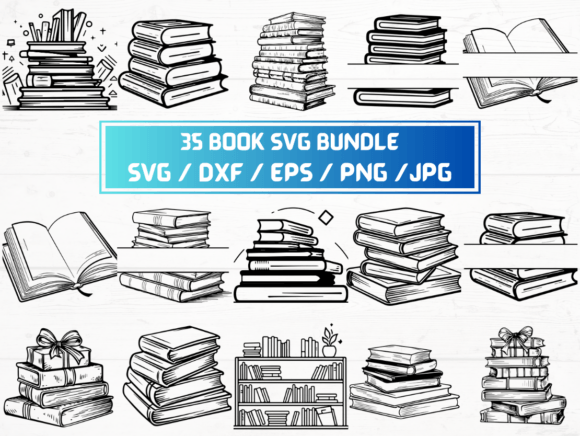
This listing includes 35 SVG, 35 PNG, 35 DXF, 35 JPG, and 35 EPS files—175 total. That sounds generous. But if those 35 designs repeat the same layout with only color swaps, or lack variety in orientation (portrait vs. landscape), composition (open vs. closed book), or style (hand-drawn vs. modern flat), you’ll hit creative limits faster than expected.
Better approach: Skim thumbnails *before* purchase—not just for aesthetics, but for functional diversity. Do you see layered elements (separate cover, spine, shadow)? Are there alternate versions with and without text placeholders? Is there variation in perspective (side view, front cover, 3D stack)? These details impact reuse—not just volume.
Ignoring Transparency and Background Needs
PNGs with transparent backgrounds are essential for layering over photos or textured backgrounds—but only if they’re truly clean. Some Book SVG-derived PNGs include faint anti-aliasing halos, subtle white edges, or inconsistent alpha channels. That becomes obvious when placed over dark or patterned backgrounds.
Better approach: If transparency matters, verify that PNGs were exported with “transparent background” enabled—not just saved as PNG. Test one download against a black background. If you see gray fringing or soft edges, adjust your expectations—or contact the seller for clarification before bulk use.
What to Verify Before You Download
Before clicking “instant download,” ask yourself three practical questions:
- Do I know which file type my machine or software actually needs? (e.g., Silhouette Studio imports SVG and DXF—but not EPS; Cricut Design Space prefers SVG over DXF for layered cuts.)
- Will these Book SVG files integrate smoothly into my current workflow? (e.g., If you batch-generate book-themed social posts in Canva, PNGs and JPGs matter more than SVGs—unless you’re resizing dynamically.)
- Is the licensing clear for my use case? (Personal use? Commercial? Reselling as part of a physical product? Most digital Book SVG bundles allow both—but always confirm. Don’t assume “personal use only” applies to your Etsy shop or school newsletter.)
Why Format Variety Is Practical—Not Just Promotional
The inclusion of 35 SVG, 35 PNG (300 dpi, transparent), 35 DXF, 35 JPG, and 35 EPS files isn’t about padding a product page. It’s about covering real-world scenarios:
- Need to cut vinyl for a library welcome sign? Use DXF or SVG.
- Designing a blog header with a stylized book icon? PNG gives instant transparency and fast load times.
- Preparing a print brochure with bleed and CMYK? EPS or high-res JPG ensures color fidelity.
- Building a reusable Figma template for author branding? SVG preserves scalability and editability.
That breadth saves troubleshooting later—especially when collaborating across teams or repurposing assets across platforms.
A Final Note on Expectations
This is a digital product. No physical item ships. You’ll receive a ZIP folder instantly—no waiting, no tracking number, no returns. That speed is a benefit—but it also means responsibility shifts to you: verifying your system setup, checking file integrity post-download, and matching formats to intended use.
If you’re new to Book SVG, start small. Open one SVG in your preferred editor. Resize it. Try recoloring a layer. Export it as PNG. See how it behaves—before building a full campaign around it. That 5-minute test often prevents hours of revision later.
Ultimately, the best Book SVG collection isn’t the one with the most files—it’s the one aligned with how you actually work. Clarity, compatibility, and thoughtful variety beat quantity every time.