Heart SVGs, DXF, EPS, JPG & PNG Files
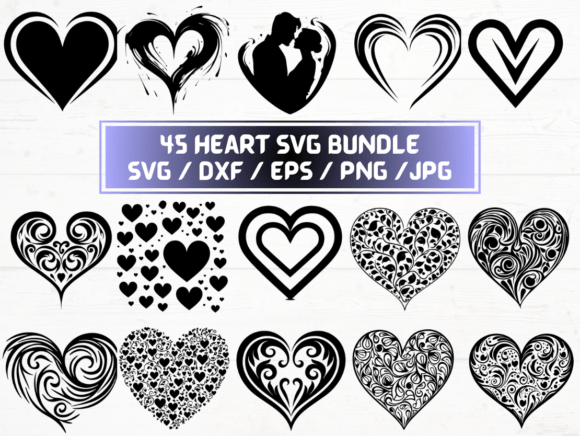
If you're designing greeting cards, crafting personalized gifts, building branded merch, or preparing classroom materials—having versatile, production-ready heart graphics saves hours. This collection delivers 90 unique heart designs in five essential formats: SVG, DXF, EPS, JPG, and PNG—all bundled in one ZIP folder with instant digital delivery.
Why Format Variety Matters More Than You Think
A single heart icon might look fine on screen—but its real-world usefulness depends entirely on how and where you’ll use it. SVG files scale infinitely without pixelation, making them ideal for web banners, responsive email headers, or interactive e-learning modules. DXF files are the standard for laser cutters and CNC machines—so if you’re cutting acrylic hearts for wedding favors or engraving wooden coasters, those 90 DXF files ensure clean, toolpath-ready vectors. EPS remains widely supported in professional print workflows, especially when collaborating with designers using older versions of Adobe Illustrator or InDesign. JPG offers universal compatibility for quick social media posts or printed flyers where transparency isn’t needed. And the 90 PNG files—300 dpi with transparent backgrounds—drop seamlessly into Canva, PowerPoint, or Shopify product mockups without white boxes or resizing guesswork.
Real-Time Workflow Wins Across Roles
A small business owner launching a Valentine’s Day pop-up can import an SVG heart directly into their Cricut Design Space to cut custom iron-on transfers for tote bags—then switch to the matching PNG to update Instagram Stories with consistent branding. A teacher preparing a “Kindness Week” bulletin board downloads the EPS version to embed in a PDF handout that prints crisply on school printers—even if the district’s software hasn’t been updated since 2019. A freelance graphic designer pitching a client presentation uses the SVG for animated hover effects in a Figma prototype, then exports the same heart as a high-res JPG for the final slide deck—no re-tracing, no quality loss.
Even subtle details add up: all 90 designs include variations—symmetrical, asymmetrical, outlined, filled, watercolor-textured, minimalist line art, and vintage-inspired silhouettes. That means you’re not just getting repetition—you’re getting intentional visual range. One heart might anchor a luxury skincare brand’s packaging; another, with delicate sketch lines, could soften a nonprofit’s donor appreciation email.
Who Benefits Most—and Why Timing Is Key
This set shines for creators who juggle multiple platforms, tools, or stakeholders—and who need consistency without compromise. Educators building digital lesson plans benefit from SVGs embedded in Google Slides (which preserve interactivity) and PNGs for printable worksheets. Marketers running time-sensitive campaigns skip the back-and-forth of requesting alternate file types from designers—or worse, settling for low-res stock assets that blur when scaled. Crafters using Silhouette Studio, Sure Cuts A Lot, or LightBurn gain immediate access to native-format files instead of wrestling with conversions that degrade edges or misalign layers.
It’s also valuable for teams working asynchronously. A remote marketing team can share the ZIP folder once—and everyone pulls the exact format they need: the copywriter grabs JPGs for blog thumbnails, the developer drops SVGs into the site’s codebase, and the production manager sends EPS files to the printer—all from the same trusted source.
What This Isn’t—and When to Look Elsewhere
This is a digital asset pack—not custom design work, not licensed commercial use for resale of the files themselves, and not editable source files like layered Photoshop documents or Illustrator AI files with individual stroke/fill separation. If your project requires extensive color adjustments per element (e.g., recoloring each petal separately), you’ll need vector-editing software like Illustrator or Affinity Designer to unlock full flexibility. Also, while JPG and PNG files are high-resolution (300 dpi), they’re raster-based—so avoid extreme enlargement beyond their native dimensions if sharpness is critical.
For users needing animation-ready sprites, multi-frame GIF sequences, or accessibility-optimized SVGs with semantic labels and ARIA attributes, this collection doesn’t cover those specialized needs. Likewise, if your workflow relies heavily on CAD-native formats like DWG or STEP for engineering applications, DXF here serves creative fabrication—not technical drafting.
Smart Integration Tips You Can Use Today
Start by opening the ZIP folder and scanning the naming convention—many sets label files by style (e.g., “heart-watercolor-07.svg”) or use case (“heart-outline-craft.svg”). That lets you filter fast instead of previewing dozens manually. For Cricut or Silhouette users: prioritize SVG or DXF depending on your machine’s firmware—some newer models handle SVG natively; older ones may require DXF for precise cut lines. When uploading to Etsy or Printful, use the 300 dpi PNGs—they render reliably across platform previews and maintain transparency for mockup overlays.
If you’re embedding in websites, inline SVG code (copied from the file) gives you CSS control—change color on hover, animate fill transitions, or adjust size responsively. For print projects, open EPS files in Illustrator, then export as PDF/X-4 to preserve fonts and overprints—especially important for brochures or packaging sent to commercial printers.
A Practical Alternative to Piecing Things Together
Most professionals have spent time hunting down one usable heart SVG, converting it to DXF (only to find jagged corners), then exporting a PNG that loses clarity at 2x resolution. This collection eliminates that friction. It’s not about having “more” files—it’s about eliminating format-related bottlenecks so your focus stays on message, audience, and outcome. Whether you’re illustrating a children’s book chapter about empathy, prototyping wearable tech with heart-rate UI elements, or designing inclusive health campaign materials, consistent, production-grade heart graphics reinforce tone and trust—without asking you to become a file-conversion specialist.
The instant download means no waiting for shipping confirmation emails or tracking numbers. No physical inventory to store or manage. Just organized, ready-to-deploy assets—90 designs, five formats, one cohesive system. That kind of reliability matters when deadlines are tight, tools change often, and your credibility hinges on polished execution—not technical troubleshooting.