Elephant SVG Files: A Practical Guide for Crafters, Designers, and DIY Enthusiasts
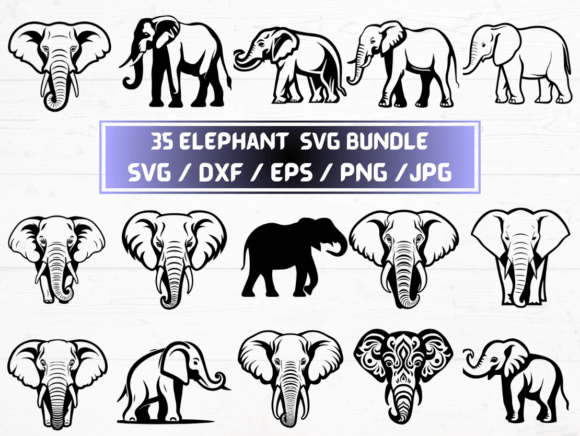
An Elephant SVG is a scalable vector graphic file designed specifically for digital cutting machines, graphic editors, and print-on-demand workflows. Unlike raster images (such as standard JPGs or PNGs), an Elephant SVG retains crisp clarity at any size—making it ideal for applications ranging from vinyl decals and Cricut projects to embroidery digitizing and custom apparel design. This particular collection includes 35 unique elephant-themed designs, each delivered in five widely compatible formats: SVG, DXF, EPS, PNG (300 dpi with transparent background), and JPG.
What Makes This Elephant SVG Collection Distinct?
Not all elephant-themed design bundles offer the same level of format versatility or production readiness. This set stands out because every design is provided in five native file types, not just one or two. That means users aren’t forced to convert files—often losing quality or layer integrity in the process. The inclusion of DXF files supports compatibility with Silhouette Studio and other CAD-based tools; EPS ensures broad support in Adobe Illustrator and legacy print environments; and the high-resolution PNGs with transparency eliminate the need for manual background removal when overlaying onto photos or templates.
Equally important is consistency: all 35 designs are built to the same technical standard—clean paths, properly grouped layers, and optimized node counts. That reduces troubleshooting time when importing into cutting software like Cricut Design Space or Sure Cuts A Lot. It also means fewer surprises during test cuts or print previews.
How Elephant SVG Compares With Other File Types and Bundles
When evaluating digital design assets, format coverage matters—but so does context. An Elephant SVG alone may suffice for someone using only a Cricut machine and working exclusively in Design Space. But if you’re also preparing artwork for screen printing, laser engraving, or professional vector editing, relying solely on SVG introduces limitations. SVG lacks native support for CMYK color profiles, spot colors, or advanced typography embedding—capabilities built into EPS and sometimes preserved in well-structured DXF exports.
Compare this to a basic PNG-only pack: while convenient for quick overlays or social media graphics, those files can’t be resized without pixelation and won’t cut cleanly on vinyl or cardstock. Similarly, a single-format EPS bundle might serve print shops well but leave crafters struggling to import into consumer-grade cutting apps that don’t read EPS natively.
This Elephant SVG collection bridges those gaps—not by overcomplicating the workflow, but by giving users choice without requiring technical conversion skills. You decide whether to use the SVG for quick drag-and-drop cutting, the DXF for precise contour tracing, or the EPS for archival or commercial handoff.
Practical Use Cases Where This Elephant SVG Set Delivers Value
- Home Crafters: Creating personalized baby shower decorations, nursery wall art, or wooden elephant coasters. The transparent PNGs work instantly in Canva or PicMonkey; the SVGs load directly into Cricut or Silhouette.
- Small-Business Owners: Building a themed product line—think elephant-shaped iron-on transfers, engraved wooden keychains, or sublimation mugs. Having both vector and high-res raster files simplifies mockup creation and production handoffs.
- Educators and Therapists: Using elephant motifs in sensory bins, visual schedules, or social-emotional learning tools. The clean outlines and consistent sizing help maintain accessibility and reproducibility across materials.
Tradeoffs to Consider Before Choosing This Elephant SVG Bundle
No digital asset is universally optimal—and understanding where this set falls short helps avoid mismatched expectations. First, it’s a digital-only download. There’s no physical sample, no customer service for design customization, and no license to resell the files as-is in marketplaces like Etsy or Creative Market. The license permits personal and small-business commercial use (e.g., selling finished products you make with the files), but not redistribution of the source files themselves.
Second, while the 35 designs cover varied styles—silhouettes, line art, geometric patterns, and stylized illustrations—they don’t include editable color palettes or layered PSD files. If your workflow depends on adjusting individual elements within Photoshop or applying non-destructive effects, you’ll need to recreate those steps manually after importing.
Third, the set assumes baseline familiarity with file management and software-specific import protocols. For example, some versions of Silhouette Studio require DXF for complex compound paths, while newer Cricut firmware handles SVG more reliably—but older machines may still prompt warnings about unsupported attributes. Users new to vector workflows should budget time for testing one file before scaling up.
When This Elephant SVG Collection Is Likely the Right Fit
This bundle serves best when you need immediate, multi-format access to cohesive, production-ready elephant motifs—and you already have or plan to use tools that support SVG, DXF, EPS, PNG, or JPG inputs. It suits users who value consistency across platforms, prefer avoiding third-party converters, and want to minimize trial-and-error during setup.
It’s especially practical for those managing multiple output channels—for instance, a maker who sells laser-cut wood ornaments (using DXF), prints greeting cards (using high-res PNG), and offers downloadable coloring pages (using simplified SVG outlines). In those cases, having all formats pre-packaged saves hours of re-exporting and re-testing.
When You Might Want to Explore Alternatives
If your primary need is deep customization—like editing individual anchor points across dozens of files in Illustrator—you may benefit more from a layered AI or PSD package, even if it requires additional licensing or learning. Likewise, if you’re building a brand identity system and need Pantone-matched vectors with embedded fonts and global swatches, a custom-designed logo suite would better meet those goals than a themed clipart collection—even one as robust as this Elephant SVG set.
And if your focus is strictly on digital illustration—say, creating animated SVGs for websites or interactive educational content—then raw vector files alone won’t be enough. You’d likely pair them with JavaScript libraries or CSS animation tools, meaning file structure, naming conventions, and semantic grouping become more critical than format count.
Making a Confident Decision
Choosing the right Elephant SVG resource isn’t about finding the “most files” or “lowest price.” It’s about matching technical scope to real-world usage. Ask yourself: Which software do I use daily? What outputs do I produce most often? How much time am I willing to spend converting, troubleshooting, or reworking assets?
This collection answers those questions by offering breadth without bloat—35 thoughtful designs, five reliable formats, and zero physical overhead. It doesn’t replace specialized tools or bespoke design services, but it removes common friction points for makers who need dependable, ready-to-deploy elephant motifs across diverse creative tasks.
Because it’s an instant download ZIP folder, there’s no waiting for shipping or vendor approval—just direct access to files you can test, adapt, and apply immediately. That immediacy, combined with cross-platform compatibility, makes it a pragmatic option for anyone evaluating digital design resources with care and intention.