Star SVG, DXF, EPS, JPG & PNG Files
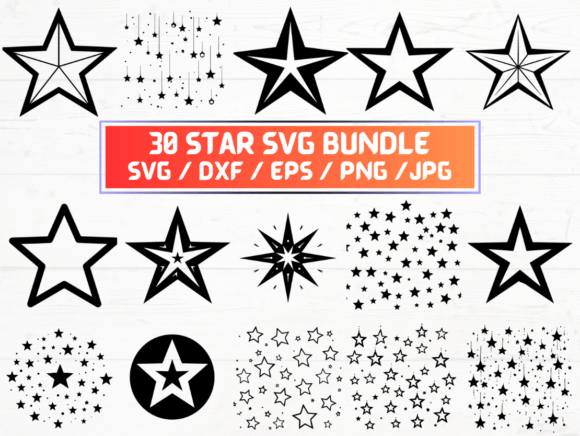
Stars aren’t just celestial objects—they’re versatile design elements with instant visual impact. Whether you’re cutting vinyl for a custom t-shirt, layering graphics in Canva, or prepping artwork for large-format printing, having a reliable, multi-format star collection saves time and expands creative control. This set delivers exactly that: 30 distinct star designs—each available in SVG, DXF, EPS, JPG, and PNG (300 dpi, transparent background)—packaged into one instantly downloadable ZIP file.
Why Format Variety Matters More Than You Think
Not all design workflows are the same—and neither are the tools we use. SVG files scale infinitely without quality loss and integrate smoothly into web platforms like WordPress, Shopify, or Figma. DXF files speak the language of CNC routers, laser cutters, and Cricut Design Space—ideal if you're crafting wooden signs, acrylic ornaments, or metal wall art. EPS is the long-standing standard for professional print houses and vector editors like Adobe Illustrator, ensuring compatibility across legacy and modern setups. JPGs offer quick previewing and social media sharing, while high-resolution PNGs with transparency let you drop stars cleanly over photos, presentations, or marketing banners—no background cleanup needed.
Creative Uses That Go Beyond Decoration
A star isn’t just a shape—it’s a signal. It can mean achievement (“Employee of the Month”), celebration (“Birthday Bash”), guidance (“Star Rating”), or even rebellion (“Punk Rock Patch”). Here’s how different users apply these files in real-world contexts:
- Small business owners add stars to product labels, loyalty cards, or storefront window decals—using SVG for website icons and DXF for custom-cut signage.
- Educators import PNGs into Google Slides or PowerPoint to highlight key concepts, reward student milestones, or build interactive classroom posters.
- Fashion designers layer EPS files into textile pattern software, rotate and repeat stars for border motifs on scarves or fabric prints, then export clean separations for screen printing.
- Bloggers and content creators use transparent PNGs to annotate screenshots, emphasize quotes in Instagram carousels, or animate subtle star bursts in CapCut or Premiere Pro.
- Hobbyists with Cricut or Silhouette machines open DXF files directly—no tracing, no converting—just select, resize, and cut on cardstock, iron-on vinyl, or balsa wood.
Design Consistency Without Creative Compromise
Having 30 unique stars means variety—but consistency still matters. These files share clean lines, balanced proportions, and uniform stroke weights where applicable. That makes mixing them in one project feel intentional, not chaotic. For example, pairing a minimalist five-point star (SVG) with a vintage-style eight-point compass rose (EPS) works because both honor the same underlying grid logic and anchor point alignment. When building branded assets, start by selecting three stars that reflect your tone—e.g., sharp-edged for tech, hand-drawn texture for artisanal brands—and use them across touchpoints: favicon (SVG), packaging foil stamp (DXF), and email header (PNG).
Practical Tips for Getting the Most Out of Your Files
Before diving in, consider your end use:
- For digital displays: Use SVG when embedding on websites or apps—it loads fast, respects responsive layouts, and stays crisp on Retina screens.
- For physical production: Choose DXF for CNC/laser work (ensure your machine supports .dxf v12 or v14), EPS for offset printing, and PNG only when raster output is unavoidable (e.g., embroidery digitizing previews).
- To maintain flexibility: Edit in vector format first (SVG/EPS/DXF), then export final versions as needed—don’t edit JPGs or PNGs and expect to recover vector precision.
- For accessibility: When using stars as icons (e.g., rating systems), pair them with descriptive alt text or ARIA labels—especially important if relying on SVG inline code.
No Guesswork, No Waiting—Just Ready-to-Use Precision
This is a digital-only product. There’s no shipping, no tracking number, no delay between idea and execution. As soon as your purchase processes, you’ll receive an email with a secure download link. All files are organized clearly inside the ZIP folder—no nested subfolders, no cryptic naming. Each star is numbered and named intuitively (e.g., “Star_07_Simple_FivePoint.svg”) so you can locate what you need in seconds—not minutes.
Who Benefits Most—and How
If you’ve ever spent 20 minutes searching for “free star vector no watermark,” only to hit licensing walls or blurry downloads, this set solves that friction. Freelancers building client brand kits appreciate the cross-platform reliability. Marketers running seasonal campaigns (think Fourth of July, holiday gifting, or back-to-school launches) reuse stars across email headers, social ads, and printable checklists—without reformatting each time. Even educators preparing hybrid lesson materials find value: one star becomes a sticker in Seesaw, a badge in ClassIn, and a cut-out for a hands-on geometry activity—all from the same original file.
Keep It Useful, Keep It Real
You don’t need every format for every project—but having them available means you’re never stuck choosing between convenience and quality. That flexibility supports thoughtful work: cleaner mockups, faster prototyping, more confident client revisions, and fewer last-minute “Can you make this work in Illustrator?” requests. And because all files are original—not traced or auto-traced—you retain full commercial rights for personal and client projects (excluding resale of the files themselves).
Start Simple. Build With Confidence.
Open the ZIP. Drag an SVG into your browser. Drop a PNG into your newsletter template. Import a DXF into your cutting software. See how easily it fits. Then ask: What’s one thing I’ve been putting off because I didn’t have the right star? A welcome banner for your new course? A subtle watermark for your photography portfolio? A bold centerpiece for a conference backdrop? The files are ready. Your next step is too.